



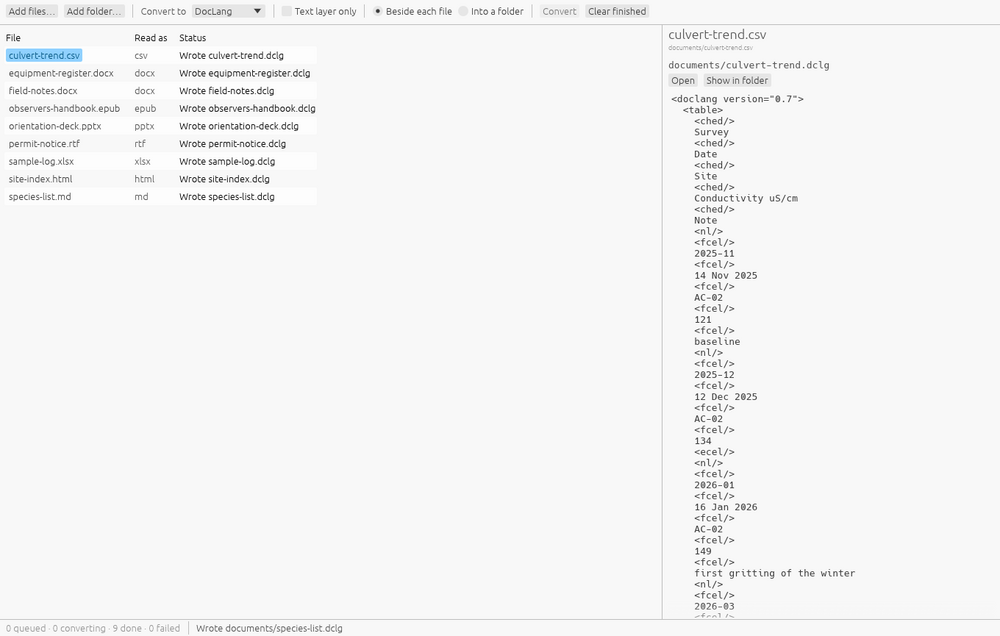
The front of the path
DocLang is only useful once a document has been turned into it. Duckling is the window for that step. Drop in Word, PowerPoint, Excel, PDF, HTML, EPUB, RTF, OpenDocument, Apple iWork, email, Visio and some forty other formats, choose what to convert to and where to put it, and press Convert. A folder contributes every file under it that can be read, so a batch is one drop.
The output can be DocLang as a .dclx archive, Markdown, docling JSON, LaTeX, ODT, ODS, ODP, DOCX or XLSX. The DocLang archive carries a page image per page and the document’s pictures, which is what lets Segler show the scan beside the text it was read from. Bare DocLang gets its pictures in an assets/ folder beside the file.
Nothing leaves the machine
Scanned PDFs and images are read by layout, OCR and table-structure models that ship inside the application, so there is nothing to download after installing, no account and no service to be down. Nothing is sent anywhere. Nothing is converted until Convert is pressed, so the format and destination chosen at that moment apply to the whole batch, and an existing file is never overwritten: a second report.md becomes report (1).md.
The engine is docling.rs
The converter is docling.rs, the Rust port of IBM’s Docling. Duckling is the window around it and adds no conversion logic of its own, so what Duckling writes is what docling.rs writes, and an improvement to the engine arrives as a new Duckling. The ecosystem page says more about the engine and the other ways to run it, including a version that runs in a browser tab.
Get Duckling
macOS from the Mac App Store, on Apple silicon. Windows from the Microsoft Store. Debian and Ubuntu from the Excelano apt repository:
curl -fsSL https://excelano.com/apt/setup.sh | sudo sh && sudo apt install ducklingThe source is at github.com/excelano/duckling. Duckling is not related to the other projects called Duckling, among them a web interface for Python Docling and Facebook’s entity extractor; this one is the desktop converter above.